Opal is Optimizely’s dedicated AI platform, built to connect directly with the Optimizely Content Management System (CMS) and Content Marketing Platform (CMP). It ships with ready-to-use agents (like Blog Post Generation and Content Translation), supports custom agent building through instructions, prompt templates, and tools, and can automate workflows across a company’s entire content and task ecosystem — from drafting content to QA testing to task tracking.
Key Takeaways
- Opal is one of the only AI platforms built natively into a CMS, giving it direct access to both content and task data across the Optimizely suite.
- Ready-to-use agents (Blog Post Generation, Content Translation, and others) require no setup and are accessible to non-technical users.
- Custom agents are built from three components — instructions, prompt templates, and tools — and Optimizely recommends the CLEAR framework for structuring prompt templates.
- Native integration with the CMP and CMS lets Opal automate both task management (alerts, comments, status tracking) and content workflows (page generation, QA testing, reviewer assignment).
- Chaining agents together across the CMP and CMS makes it possible to automate an entire content pipeline end to end.
Why a connected AI ecosystem matters
Knowledge begets power, a statement that especially holds for LLMs. The more sources of data one has access to, the more it knows and the further it can reach. Regardless of whether a company puts one to use, an AI platform is most effective under the same conditions: when it can interweave its functionality with other internal services to construct an ecosystem of shared knowledge.
Through API bridges that connect a company’s software, the possibilities for automation across an ecosystem of products can become truly endless. It’s possible to have recorded meeting notes passed to Jira for ticket creation, agents that generate content and trigger a task for manual approval, or timesheets that log a developer’s active time working on a ticket. Because Optimizely prioritizes ease of product integration across all facets of their software, no suite of services facilitates this kind of data sharing better than Optimizely and its new AI platform, Opal. As one of the only Content Management Systems with a dedicated AI platform, Optimizely opens the door for boundless possibilities.
What ready-to-use agents does Opal include?
Optimizely designed Opal to be a marketing or content strategist’s dream, and not just because of how it can interface with their Content Management System. Opal also includes a host of ready-to-use agents that you can leverage immediately for small efficiency wins, such as its Blog Post Generation or Content Translation Agents. For example, beyond just content generation, some agents help with optimization reports and or generative engine optimization (GEO) recommendations, all without requiring any agent development. The ready-to-use agents make it so that even the most luddite content managers can get up and running while avoiding the headaches that can arise when building an agent from scratch. With usability another of Opti’s main priorities, they put considerable thought into their UX so that people with non-technical backgrounds can also take advantage of Opal.
In Opal’s prompt input box, ready-to-use agents can be called by name or selected from a dropdown. With the homepage directing the user to one of these input boxes, the amount of UI to sift through has been completely minimized. Even better, working within a prompt allows the user to ask for clarification and get immediate answers, such as how to structure the input to incorporate parameters. These user-friendly design practices make Opal as accessible as any other LLM while also bringing the additional functionality of the Optimizely Ecosystem.
How do you customize an Opal agent? (instructions, prompt templates, and tools)
Before diving into a few proven examples of agent designs that make the most use of Optimizely’s ecosystem, I need to delve a little deeper into Opal’s more technical customization options. For those interested in using Opal to its fullest, instructions, prompt templates, and custom tools put the platform’s full power at your fingertips.
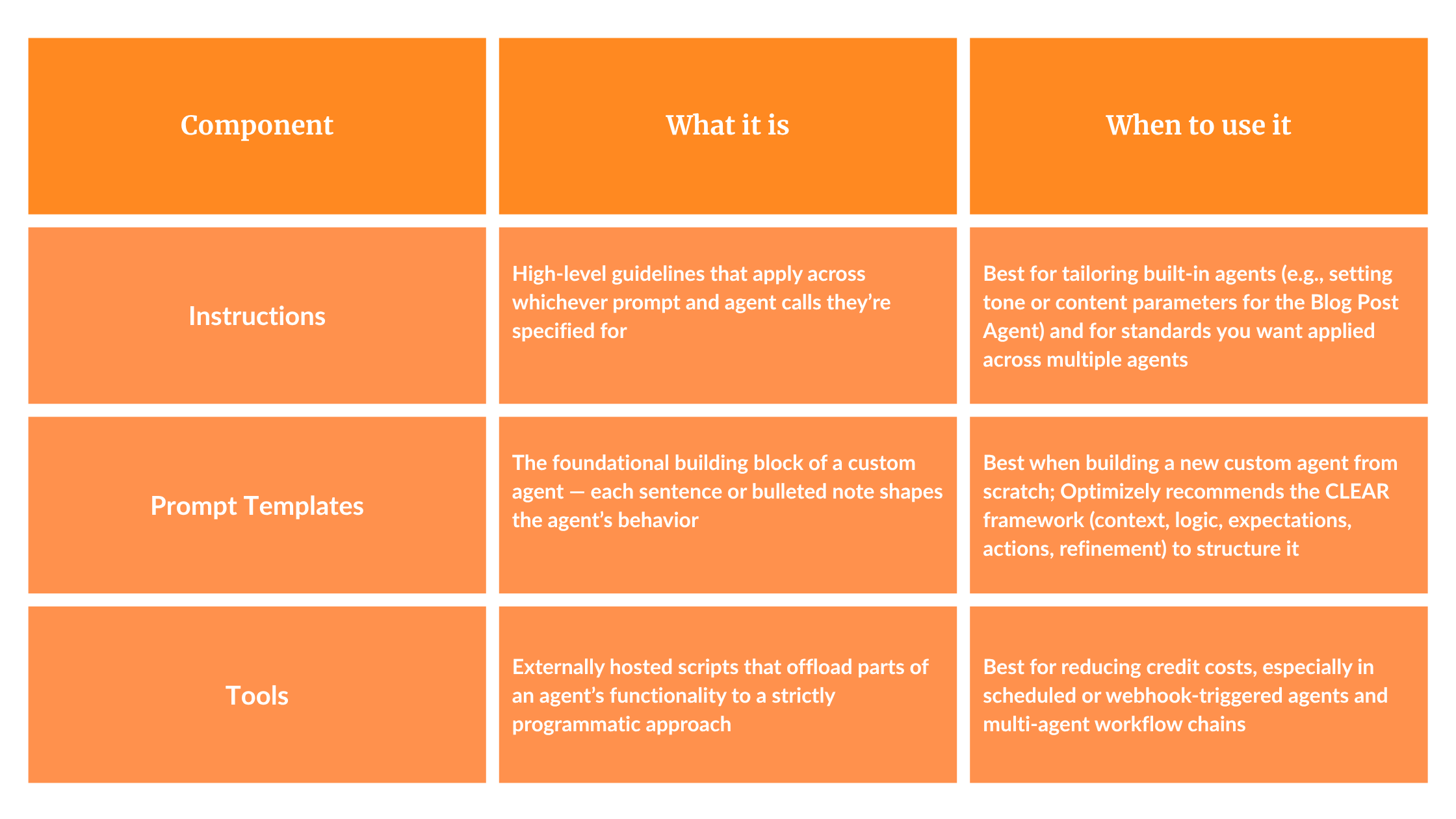
Starting from the top down, instructions are high-level guidelines that affect whichever prompt and agent calls they’re specified for. An example relating to some of the previously discussed ready-to-use agents would be setting tone or content parameters for the agent capable of generating blog posts. While those guidelines could just be included in the prompt template for a custom agent, because the Blog Post Agent is built-in, instructions are the best way to tailor their output. Even in the case of a user-built agent where those specifications can be added, instructions grow in usefulness the more agents they apply to, and there will most likely be more than one agent responsible for the content users read.
Moving on from instructions, a prompt template is the foundational building block of a custom agent; each sentence or bulleted note serves as a bone in the skeleton of the desired agent. Within the template text box, you can achieve any design; only your own ability to convey what you want, functionality-wise, limits you. Optimizely recommends the CLEAR (context, logic, expectations, actions, refinement) architecture when you construct a new agent from nothing, so that Opal can most clearly interpret your intended design. In the agent’s settings, past the template field, you’ll find a few additional parameters, such as creativity and complexity, to help you tune the agent. In that section below the template, you can also attach tools so that you can incorporate them into the prompt’s logic.
Tools are the final piece of agent customization to discuss before getting to the wider network of connections Opal can establish with other products. Tools are externally hosted scripts used to offload sections of an agent’s functionality to a strictly programmatic approach. Removing the need for an agent to interpret logic or run code drastically reduces credit costs, especially when multiple agents are chained together in a workflow. For agents that run at a scheduled time or are triggered by another webhook, keeping costs as low as possible is super important to avoid overusing credits and racking up a large bill. With all of these options in place for agent construction, Opal solves most automation needs even before establishing its ecosystem with the rest of the Optimizely suite.
How does Opal integrate with the Optimizely CMP and CMS?
Now that we’ve gone over the basics of Opal agents, we can dive into the suite of other products they can act upon, the two most significant of which are the Content Marketing Platform and the Content Management System. There are integrations with many other platforms, and Optimizely is continually developing new software, which means the ecosystem will only become stronger and more capable in the future. Already, we’ve seen proven results of the Optimizely ecosystem’s efficacy through work with one of our clients that heavily uses the CMP.
To give a brief overview of the CMP: it is a work management tool akin to Jira, in that it can log tasks with individually assigned steps and track the current status of the work and its assignees. The potential benefit of Opal is that it can affect any tasks, or even the files attached to them, because of the way Optimizely designed the API to pass data. In practice, we’ve used this to send email alerts when a task or one of its steps is overdue, push a comment to the task detailing which part of a file needs to be looked into, and track progress through external steps by marking them as in progress or completed. This additional layer of functionality, when incorporating Opal, allows a company’s entire task board to be automated.
For the CMS, the most common use is generating new content for publication on pages or for QA testing. For the latter, we’ve found Opal particularly invaluable, as leveraging AI’s quantity-over-quality approach to writing is especially useful for creating test cases that cover all possible configurations. Due to the connections with the CMP as well, it’s entirely possible to create a workflow pipeline that generates page content and then combine it with another agentic workflow to assign reviewers. This is just one example, but it demonstrates the idea behind the interconnected ecosystem and the breadth of potential use cases for Opal.
With a platform so multifaceted and offering so many customization options, the ceiling for automation just got raised. By combining Opal with third-party platforms or the other software native to its suite, the possibilities are truly endless, and the future of content management and automation is bright!
Want to get started implementing Opal into your own internal workflows? Contact our team.
FAQ: Optimizely Opal and the AI Ecosystem
What is Opal? Opal is Optimizely’s dedicated AI platform, designed to integrate natively with Optimizely’s Content Management System (CMS) and Content Marketing Platform (CMP), enabling automation across a company’s content and task workflows.
What can Opal’s ready-to-use agents do? Out of the box, Opal included agents for tasks like blog post generation, content translation, optimization reporting, and GEO recommendations — all usable without building a custom agent.
Do you need technical skills to use Opal? No. Opal’s prompt input box lets users call ready-to-use agents by name or select them from a dropdown, and its UX is built so non-technical content managers can use it effectively.
How do you build a custom agent in Opal? Custom agents are built from three components: instructions (high-level guidelines that apply across prompts and agents), a prompt template (the agent’s core structure ideally built using Optimizely’s recommended CLEAR framework — context, logic, expectations, actions, refinement), and tools (externally hosted scripts that offload logic to reduce credit costs).
What is the CLEAR framework in Opal? CLEAR stands for context, logic, expectations, actions, and refinement. Optimizely recommends this architecture when building a new agent’s prompt template from scratch to ensure Opal interprets the intended design clearly.
How does Opal connect to the Optimizely CMP? Opal can act on CMP tasks and their attached files — for example, sending email alerts for overdue tasks, posting comments on tasks, and tracking progress on external steps.
How does Opal connect to the Optimizely CMS? Opal is most commonly used with the CMS to generate new page content and to support QA testing by generating test cases that cover a wide range of configurations.
Can Opal automate an entire content workflow? Yes. Because Opal connects to both the CMP and CMS, it can chain agents together — for example, generating page content and then triggering a separate workflow to assign reviewers — automating a full content pipeline end to end.